 Xur
XurA desktop that stays yours.
Give each workstation a name, a user and a GPU. Reuse that identity when your profiles change.
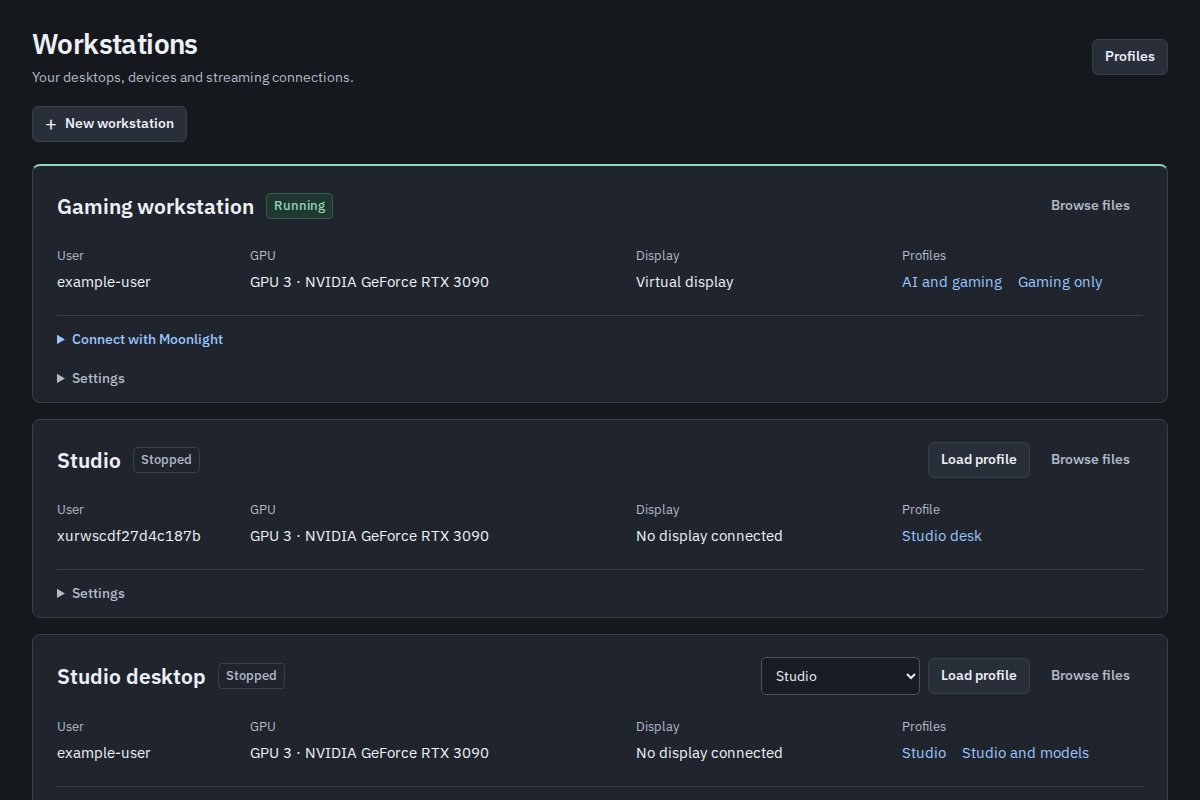
Create a workstation
Use Workstations to create and name a desktop identity. Choose a persistent user to retain home files, games and logins. Temporary users are disposable. In the profile editor, choose an existing workstation or create a new one.
Each simultaneous workstation needs a distinct Unix user and GPU. Moving a workstation to another GPU restarts its desktop, while keeping its identity and Moonlight pairing.
Assign input and audio
Select individual USB devices or a hub with supported descendants. A unique serial number follows the device best when ports change. Without a serial, assignments follow the physical controller and port path. Check duplicate-serial warnings before saving.
Choose one primary workstation to receive otherwise unassigned input and built-in audio. Assigned USB audio and display audio follow the corresponding workstation. Raw USB storage and controller passthrough are outside this feature.
Connect with Moonlight
- Load the workstation profile and wait for its streaming service to become ready.
- Install Moonlight on your client.
- Open Workstations → Connect with Moonlight and add the displayed address in Moonlight.
- Select the host in Moonlight, refresh clients in Xur and approve the pairing request with its four-digit PIN. Choose Desktop in Moonlight.
A monitor does not have to be connected: Xur can prepare a virtual display. For access away from home, connect both machines to your tailnet and use the host address shown by Xur.
If the picture or input fails
Open the workstation's logs and Graphics report. Check the assigned GPU, streaming status and display first. Download Diagnostics when reporting a problem, and remove personal information before posting it publicly.
Multiple-workstation hardware acceptance is still in progress. Read the multiseat design and validation limits before depending on isolation between different people.